Calculate, Verify File Checksum: CRC, SFV, MD5, SHA1, SHA256, SFV Viewer, SFV Creator, Easy SFV compatible
Description of Renamer plugin for Altap Salamander
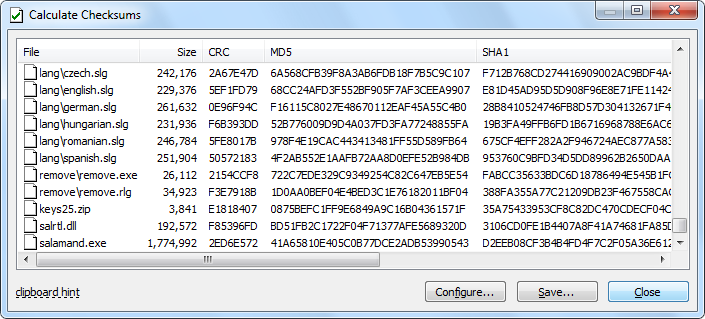
- Quick calculate CRC (SFV), MD5, SHA1 or SHA256 checksum of files (like SFV Creator, MD5 Creator).
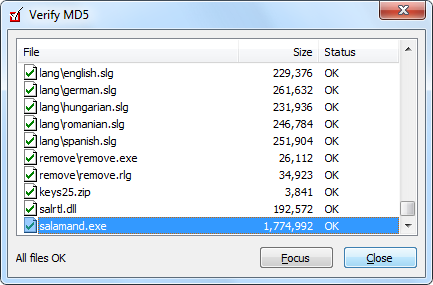
- Quick verify CRC (SFV) and MD5 checksum (like SFV Viewer, MD5 Viewer).
- Copy checksums to the Clipboard.
- Recursive directories are supported.
- Compatible with popular utilities md5sum, Easy SFV Creator, WinSFV, or QuickSFV, SFV Maker, MD5 Maker.
Altap Salamander 4.0 - Download | Screenshots | Features
Calculating files checksum with Altap Salamander
Verifying MD5 checksum with Altap Salamander
How to calculate files checksum?
- Download and install Altap Salamander 4.0 File Manager.
- Select desired files using the Insert key or using mouse.
- From menu Plugins choose the Checksum / Calculate Checksums command.
- For more details see Calculating Checksums in Altap Salamander Help.
How can verify CRC, SFV, MD5, SHA1 or SHA256 checksums?
- Focus desired file in Altap Salamander panel.
- From menu Plugins choose the Checksum / Verify Checksums command.
- For more details see Verifying Checksums in Altap Salamander Help.
Why choose Altap Salamander as file manager?
- All-in-one solution.
- Unified design and control.
- Intuitive and effective interface.
- Power user functionality, short learning curve.
- Keyboard and mouse shortcuts for most commands.
- High quality software with emphasis on error states.
- Superior quality with emphasis on safety of your files during error states.
File manager Altap Salamander in a nutshell
- Altap Salamander is a native Windows application with modern and clean design.
- Using graphic instead of text mode brings easy to use and powerful user interface.
- Well-established shortcuts from Norton Commander and Windows.
- Drag&Drop support, mouse shortcuts for most frequent commands.
- Handy support for clipboard: you can copy file name with full path on clipboard.
- Quick search is really quick: just start typing the name of file you are looking for.
- Advanced Select/Unselect commands including Save and Load Selection.
- Operations are started on background; you needn't wait until operation is finished.
- Thumbnails view mode for digital camera users, graphic designers, web masters, etc.
- PictView viewer for more than 40 bitmap file formats.
- Fast text and binary viewer with hexadecimal and ASCII modes. Large files over 4GB supported.
- Support for Regular Expressions in viewers and Find. Wildcards for easy filenames selecting.
- Database viewer for DBF and CSV files, Multimedia viewer for MP3, OGG or STM files.
- Portable Executable viewer will say you all about EXE or DLL files.
- With Internet Explorer viewer you can quickly display your HTML file.
- Well-arranged Find dialog with many find options including searching for duplicates.
- Make File List command allows you export files and directories listings to text file.
- List of shared directories with option to stop sharing.
- Changing file and directory names to lower, upper or mixed case.
- Converting end of line (EOL) characters between Windows, MAC and UNIX.
- Changing coding of text files (CP1250, CP852, KOI-8, Kamenicti, EBCDIC, etc.).
- List of recently opened files and working directories for easier access.
- Comparing directory trees by name, date, time, attributes, or by content.
- Internal support for most major archives: ZIP, RAR, ARJ, LZH, LHA, LZS, 7-ZIP, TAR, TGZ, BZ, BZ2, RPM, CPIO, Z, PK3, JAR, and Microsoft CAB.
- Possibility to make self-extracting archives with custom icons, texts and behavior.
- Open CD or DVD ISO image files, browse all sessions, view and extract contained files.
- Open and extract MIME/Base64 email messages. yEncode and BinHex decoder.
- Open and browse Outlook Express DBX archives, save email attachments.
- User friendly configuration. All options are accessible from dialog boxes or menu.
- Open plugin architecture to enable third-party plugins and extensions.
- Advanced file comparator for text and binary files will display differences.
- Advanced batch renamer for easy renaming of your files and directories.
- FTP Search for searching on FTP servers.
- Registry editor for browsing, viewing, and editing of your Windows Registry.
- Support for splitting and combining files.
- WinSCP plugin based on famous SFTP and SCP client.
- FTP client with clever non-blocking design allows postpone solving of errors.
- Checksum plugin will calculate and verify CRC32 (SFV) and MD5 file checksums.
- Files encryption and decryption using strong encryption algorithms: AES (Rijndael), Blowfish, and TripleDES in either ECB or CBC mode.
- Open FAT 12, 16, or 32 disk image, browse directories and view or extract required files.
- Undelete plugin for recovering deleted files from your FAT or NTFS partitions.
- Windows Mobile plugin for accessing Pocket PC, Pocket PC Phone Edition, Smartphone, and Windows CE devices from Altap Salamander.
- And much much more... download Altap Salamander 4.0 and try it yourself.